Monday, June 3, 2019

Different ways to add icon to your react office fabric UI project

You might need to add icons to your react office fabric UI project and here are different ways for your reference.

1. Add Office fabric icon directly if the component accept icon attribute. Here is one example for Pivot component for "Search" icon and "SearchAndApps" icons. The UI is displayed as the screenshot below.

              <Pivot>
                  <PivotItem headerText="Search by Isis Numbers" itemIcon="Search">
                    {/* Some React components here*/}
                  </PivotItem>
                  <PivotItem headerText="Search by Compound or Target" itemIcon="SearchAndApps" onRenderItemLink={this._customRenderer}>
               {/* Some React components here*/}                   
                  </PivotItem>

              </Pivot>


2. Add icon as separate component. Here is example to display lightbulb. There is limited style you could apply.

<div className={styles.row}>
<div className={styles.column}>
<Label required={true}> Submission Content </Label>
<Icon iconName={'Lightbulb'} className="ms-IconExample" />
</div>
</div>


You will see the lightbulb icon is in different row and it's difficult to display next to the Label in the same row. Another challenge is it's not possible to add event handler to the icon. The third challenge is the icon size is as default and will be difficult to change.

3. The third way is to convert icon to "svg" format and display in the component as below.

<div className={styles.row}>
<div className={styles.column}>
<Label required={true}> Submission Content </Label>
<svg className="umbrella" xmlns="http://www.w3.org/2000/svg"
width="32" height="32" viewBox="0 0 32 32" aria-labelledby="title">
<title id="title">Umbrella Icon</title>
<path d="M27 14h5c0-1.105-1.119-2-2.5-2s-2.5
0.895-2.5 2v0zM27 14c0-1.105-1.119-2-2.5-2s-2.5
0.895-2.5 2c0-1.105-1.119-2-2.5-2s-2.5 0.895-2.5
2v0 14c0 1.112-0.895 2-2 2-1.112 0-2-0.896-2-2.001v-1.494c0-0.291
0.224-0.505 0.5-0.505 0.268 0 0.5 0.226 0.5 0.505v1.505c0
0.547 0.444 0.991 1 0.991 0.552 0 1-0.451
1-0.991v-14.009c0-1.105-1.119-2-2.5-2s-2.5 0.895-2.5
2c0-1.105-1.119-2-2.5-2s-2.5 0.895-2.5
2c0-1.105-1.119-2-2.5-2s-2.5 0.895-2.5 2c0-5.415 6.671-9.825
15-9.995v-1.506c0-0.283 0.224-0.499 0.5-0.499 0.268 0 0.5 0.224
0.5 0.499v1.506c8.329 0.17 15 4.58 15 9.995h-5z"/>
{/* This is not wrorking!!! onMouseOut={() => this.mouseOut()}
onMouseOver={() => this.mouseOver()}>{this.label(this.state.displayDescription)} */}
</svg>
</div>
</div>
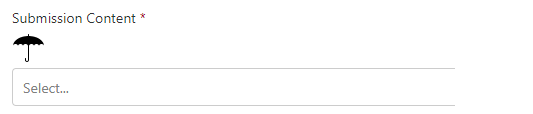

As you can see the same issue the icon is in separate line and cannot add event to the component. However, it's very easy to adjust the size of the icon. You could search the different methods to convert existing icon to svg format.

4. The forth way is to add emoji icon as text direct to the label. Here is one example.


  private label = displayDescription => {
    if (displayDescription === null) {
        return 'Mouse over to see the magic!';
      }
      return displayDescription ? 'Submission Content Details' : 'Submission Content 🔍';

  }

<div className={styles.row}>
<div className={styles.column}>
<Label required={true} onMouseOut={() => this.mouseOut()}
onMouseOver={() => this.mouseOver()}>{this.label(this.state.displayDescription)}
</Label>
</div>
</div>

You can see the icon is next to the label in same line. You could add event to the component. The only challenge is difficult to change the size of the icon.

Now you have the different ways to add icons to your React Office UI project. There are many different icons you could use. Here is the list.


  • Office fabric UI icons here and examples here
  • Material UI icons here and examples here
  • Semantic icons here
  • Fount awesome icons here
  • Other icon here
If you need to add icons to SharePoint list as list format, you could refer the good articles here.


Tuesday, May 14, 2019

Procedure and tips to upgrade SharePoint framework project to 1.8.2

SharePoint framework version 1.8.2 released on May 7, 2019 along with many new features from 1.8 and few issues fixed. The major issues fixed are out of memory exceptions and Node.js 10 support.

Since SPFx 1.8.2 supports Node.js 10, it's a best practice to upgrade Node.js. We have a SPFx 1.7.1 that has been developed for over six month. What I did is to upgrade the SPFx to 1.8.2 first and then upgrade Node.js to 10. Here is the complete upgrade procedure based on our upgrade experience. There are few previous upgrade articles you may found useful.

1. Make a copy of the current project before upgrading. Run the following command to see the upgrade scope.

npm outdated

Here is what I have for my project. You can verify your SPFx version. In this case it's 1.7.1.


2. Install office365-cli upgarde command package using the following command. This is recommend upgrade method.

npm install -g @pnp/office365-cli

3. Use cli to generate upgrade instructions as the following command. Please run this command at the root of the project. The instruction will be saved to a file named "upgrade.md" displayed in the below screenshot.

o365 spfx project upgrade -o md > upgrade.md


4. Follow the each step in "upgrade.md" file to upgrade all the necessary packages. Each command has the instruction in the "upgrade.md" file. You might need to add "," for few lined added like the one below.

### FN012017 tsconfig.json extends property | Required

Update tsconfig.json extends property

In file [./tsconfig.json](./tsconfig.json) update the code as follows:

```json
{
  "extends": "./node_modules/@microsoft/rush-stack-compiler-2.9/includes/tsconfig-web.json"
}
```


File: [./tsconfig.json](./tsconfig.json)


This is the line you need to add "," at the end.
"extends": "./node_modules/@microsoft/rush-stack-compiler-2.9/includes/tsconfig-web.json",

"supportedHosts": ["SharePointWebPart"],


5. Run the following command to identify any missing third party components. Please pay attention to the packaged in RED.

npm outdated


You might need to reinstall them and here are the two we used.

npm install  react-select --save
npm install  @types/react-select –save

6. Upgrade other package in RED like @pnp/sp using the following command.

npm install @pnp/logging @pnp/common @pnp/odata @pnp/sp –save

If you run "npm outdated" again, you will have the following message. All RED messages have been resolved.


7. Try to clean and build the project and fix any issue. You may not have any compilation error but you should open the source file one by one to verify if there is any error. In our case, we have one error on the "TeachingBubble" Office fabric UI component as below. However, the gulp did not catch the error.


This is the change we made to fix this error.
                  {isTeachingBubbleVisible ? (
                    <div>
                      <TeachingBubble
                        targetElement={this._menuButtonElement}
                        hasSmallHeadline={true}
                        onDismiss={this._onTipDismiss}
                        hasCloseIcon={true}
                        primaryButtonProps={examplePrimaryButton}
                        headline="Some useful tip here. Boom!"
                      />
                        Some notes here about publiations and submissions. Could
                        include link to a web page with additional details.                       
                    </div>

                  ) : null}

During future upgrade, some react component may be changed and you will need to upgrade the code to latest implementation.

Please double check all source files and ensure no compilation error.

8. Upgrade Visual Studio code to latest version that is 1.33. at this time. This is recommended but not required.


10. Compile the project and verify everything work as expected.

gulp build
gulp serve

11. Upgrade Node.js to 10 that is recommended but not required.  
Remove the existing Node.js 8 from "Apps & features". Then download Node.js 10 and install. You could verify the new version using the following command. You could "ctr' + click" to open the file needs to be modified.

node -v

12. You may upgrade npm also.

npm install -g npm@latest

13. Upgrade gulp and yeomen generator using the following commands. You should also verify the generator version.

npm install -g yo gulp
npm view @microsoft/generator-sharepoint version

14. Rebuild environment related to new gulp and Node.js using the following command.

npm rebuild node-sass

15. Build the project and verify again.

gulp clean
gulp build
gulp serve

At this time, you should have the upgraded SPFx project. However, we found we have to use different generator to create new new SPFx project in 1.8.2 version. The detailed commands are listed below.

npm install -g @pnp/generator-spfx
yo @pnp/spfx

The project generated will use SPFx 1.8.2. I'm not sure if tehre is a way to use existing command yo @microsoft/sharepoint to create SPFx 1.8.2 project.

Friday, April 26, 2019

Which React Dorpdown or Selection component you should use in SharePoint framework SPFx React project?

When we use Office Fabric UI Dropdown component, we run into a issue that the value in the SharePoint list item value could not be displayed. As a result, we are looking for alternative for multiple dropdown component. Here is the list of the React dowpdown components we evaluated and my suggestion.

1. React-dropdown is a good candidate and it's extremely easy to configured. However, the issue is this is only support single selection. If you need multiple selection, this is not for you.

2. React-muti-select is another good example. However, the selected options will be displayed in another window as below picture that makes the UI not friendly.


3. Multi-select-react seems to be a nice component. However, there is an error when running this with SPFx React. This might be the version compatibility issue.

Error - [tsc] C:/Harry/Projects/Pubs/POC/Support/LookUp/node_modules/typescript/lib/tsc.js:55776
                throw e;
                ^
Error: Debug Failure.
    at typeToString (C:/Harry/Projects/Pubs/POC/Support/LookUp/node_modules/typescript/lib/tsc.js:23526:22)
    at reportRelationError (C:/Harry/Projects/Pubs/POC/Support/LookUp/node_modules/typescript/lib/tsc.js:28855:34)
    at isRelatedTo (C:/Harry/Projects/Pubs/POC/Support/LookUp/node_modules/typescript/lib/tsc.js:28972:21)
    at propertiesRelatedTo (C:/Harry/Projects/Pubs/POC/Support/LookUp/node_modules/typescript/lib/tsc.js:29382:43)
    at structuredTypeRelatedTo (C:/Harry/Projects/Pubs/POC/Support/LookUp/node_modules/typescript/lib/tsc.js:29275:38)
    at recursiveTypeRelatedTo (C:/Harry/Projects/Pubs/POC/Support/LookUp/node_modules/typescript/lib/tsc.js:29172:53) 

4. React-select-box also has an error as below.


sp-webpart-workbench-assembly_en-us_1a783b02ca664f8c65a409008ba8cbb9.js:204 Uncaught (in promise) Invariant Violation: Minified React error #130; visit https://reactjs.org/docs/error-decoder.html?invariant=130&args[]=undefined&args[]= for the full message or use the non-minified dev environment for full errors and additional helpful warnings.


5. One of the best options is from Semantic-Org. This package includes many components and css. There are many examples to use this in React project. Here is the dropdown component.


The issue I'm facing is the instructions to incorporate in the SPFx project. I have difficult to install and use the component. The css does not seem to play well with other React component. I would like to revisit when I have time.

6. The final one is the react-select component. The installation and example given are simple. One issue is the multiple selection is not user friendly. User has to select one option at a time unlike other React Drowdown you can click multiple values at one time.


It only take about 10 minutes and here is the dropdown I put together in a POC project. I've verified that this component indeed could display the SharePoint values from list item. Hope I can replace this component after Microsoft resolved the Office Fabric UI dropdown bug.


Thursday, April 25, 2019

Cannot display selected office fabric ui dropdown value from SharePoint framework

We are using SharePoint framework with office fabric UI component. The current project is to use SPFx to display an list item that has a Dropdown field. The issue is we are getting the value all options as an array from the SharePoint but cannot display the option value already set in the list.

After few days debugging the issue, we have isolated to the SharePoint framework REACT how to pass the pros from parent to child component. Here is the simple code to reproduce this issue.

1. Hard coded the array like this below in parent component named LoopUp.

private defaultOptionList: IDropdownOption[] = [
{
key: '0',
text: 'None',
isSelected: false
},
{
key: '1',
text: 'Encore/Review Publication',
isSelected: true
},
{
key: '2',
text: 'Non-Scientific',
isSelected: false
},
{
key: '3',
text: 'Assay Method',
isSelected: false
},
{
key: '4',
text: 'Research Data',
isSelected: false
},
{
key: '5',
text: 'PK/Tox Data',
isSelected: false
},
{
key: '6',
text: 'Clinical Data',
isSelected: false
},
{
key: '7',
text: 'Clinical Study Design',
isSelected: false
},
{
key: '8',
text: 'Clintrials.gov Posting',
isSelected: false
}

];

2. If we initialize the state in the constructor below and pass to child, child can display the selected option value.  The state we set up is named submissionContentListState2.

constructor(props) {

super(props);
this.state = {
submissionContentListState2: [] = this.defaultOptionList, // Set in constructor
submissionContentListState4: [] // Set in componentDidMount
};

}

3. If we set the same value from  componentDidMount  like below, child cannot display the selected value. The state we set up is named submissionContentListState4.

public componentDidMount() {
this.setState({
submissionContentListState4: this.defaultOptionList
});
}           

The code to pass to child is listed below.
public render(): React.ReactElement<ILoopUpProps> {

SPFacade.logOptions(this.state.submissionContentListState2, "Parent Rendor submissionContentListState2");
SPFacade.logOptions(this.state.submissionContentListState4, "Parent Rendor submissionContentListState4");
return (
<Child
defaultOptionListParent2={this.state.submissionContentListState2} // This is in constructor
defaultOptionListParent4={this.state.submissionContentListState4} // This is in componentDidMount
/>

);
}


The code in child is listed below.
import * as React from 'react';
import styles from './LoopUp.module.scss';
import { ILoopUpProps } from './ILoopUpProps';
import { Dropdown, IDropdownOption } from "office-ui-fabric-react";
import { SPFacade } from "./SPFacade";

export class Child extends React.Component<any,
{
}
> {
constructor(props) {
// Required step: always call the parent class' constructor
super(props);
}
public render(): React.ReactElement<ILoopUpProps> {

SPFacade.logOptions(this.props.submissionContentListState2, "Child Rendor submissionContentListState2");
SPFacade.logOptions(this.props.submissionContentListState4, "Child Rendor submissionContentListState4");
return (
<div className={ styles.loopUp }>
<div className={ styles.container }>

<div className={ styles.row }>
<div className={ styles.column }>
<Dropdown
placeHolder="Select a content type"
required={true}
label="Lokup values from parent props set in constructor - working"
options={this.props.defaultOptionListParent2}
/>
</div>
</div>

<div className={ styles.row }>
<div className={ styles.column }>
<Dropdown
placeHolder="Select a content type"
required={true}
label="Lokup values from parent props set in componentDidMount - not working"
options={this.props.defaultOptionListParent4}
/>
</div>
</div>

</div>
</div>
);
}

}


The result is show as below.

You can see the top DOM element did show the selected value named "Encore/Review Publications". However, the bottom DOM element could not display the selected value even all the option values are retrieved.

This is a show stopper for us at this point since we need to get the value from SharePoint list item and it should be done in componentDidMount function and cannot be in constructor.

If you know the solution or workaround, please let me know.

The complete parent code is listed below.

import * as React from 'react';
import { ILoopUpProps } from './ILoopUpProps';
import { IDropdownOption } from "office-ui-fabric-react";
import { Child } from "./Child";
import { SPFacade } from "./SPFacade";

export default class LoopUp extends React.Component<ILoopUpProps,
{
submissionContentListState2: IDropdownOption[];
submissionContentListState4: IDropdownOption[];
}
> {

private defaultOptionList: IDropdownOption[] = [
{
key: '0',
text: 'None',
isSelected: false
},
{
key: '1',
text: 'Encore/Review Publication',
isSelected: true
},
{
key: '2',
text: 'Non-Scientific',
isSelected: false
},
{
key: '3',
text: 'Assay Method',
isSelected: false
},
{
key: '4',
text: 'Research Data',
isSelected: false
},
{
key: '5',
text: 'PK/Tox Data',
isSelected: false
},
{
key: '6',
text: 'Clinical Data',
isSelected: false
},
{
key: '7',
text: 'Clinical Study Design',
isSelected: false
},
{
key: '8',
text: 'Clintrials.gov Posting',
isSelected: false
}

];

constructor(props) {

super(props);
this.state = {
submissionContentListState2: [] = this.defaultOptionList, // Set in constructor
submissionContentListState4: [] // Set in componentDidMount
};

}

// Get the itemId received form the parent and display attachment if itemId is not NaN
public componentDidMount() {
this.setState({
submissionContentListState4: this.defaultOptionList
});
}

public render(): React.ReactElement<ILoopUpProps> {

SPFacade.logOptions(this.state.submissionContentListState2, "Parent Rendor submissionContentListState2");
SPFacade.logOptions(this.state.submissionContentListState4, "Parent Rendor submissionContentListState4");
return (
<Child
defaultOptionListParent2={this.state.submissionContentListState2} // This is in constructor
defaultOptionListParent4={this.state.submissionContentListState4} // This is in componentDidMount
/>

);
}


}


Monday, April 15, 2019

Automate SPFx source code backup with gulp

As a developer working on SharePoint framework (SPFx) with Azure DevOps, it would be convenient to have a automation to back up the source code to local sometime. Here is the example to use gulp task. We would use backing up fiels for SPFx webparts or just components folder. You could modify for your own purpose.

To use it, you could run as the following commands.

gulp bakwebparts
gulp bakcom


gulp.task('bakcom', function() {
// copy all files in source/webparts/pubsWebPart/components to C:\PubsBackup\<year>-<month>-<date>-<hour>-<minute>\components
var backupRoot = "C://PubsBackup";

var d = new Date();
var m = Number(d.getMonth()) + 1;
var n = d.getFullYear() + '-' + m.toString() + '-' + d.getDate() + '-' + d.getHours() + '-' + d.getMinutes();

var pubsRoot = backupRoot + '/' + n;
var webparts = pubsRoot + '/webparts';
var pubsWebPart = webparts + '/pubsWebPart';
var component = pubsWebPart + '/components';
console.log("component" + component);
const folders = [
backupRoot,
pubsRoot,
webparts,
pubsWebPart,
component
];

folders.forEach(dir => {
if(!fs.existsSync(dir)) {
fs.mkdirSync(dir);
console.log('📁 folder created:', dir);
}
});

gulp.src('./src/webparts/pubsWebPart/components/*.*').pipe(gulp.dest(component));

});


gulp.task('bakwebparts', function() {
// copy all files in source/webparts/pubsWebPart/components to C:\PubsBackup\<year>-<month>-<date>-<hour>-<minute>\components
var backupRoot = "C://PubsBackup";

var d = new Date();
var m = Number(d.getMonth()) + 1;
var n = d.getFullYear() + '-' + m.toString() + '-' + d.getDate() + '-' + d.getHours() + '-' + d.getMinutes();

var pubsRoot = backupRoot + '/' + n;
var webparts = pubsRoot + '/webparts';
var pubsWebPart = webparts + '/pubsWebPart';
var component = pubsWebPart + '/components';
var loc = pubsWebPart + '/loc';
var services = pubsWebPart + '/services';
console.log("component" + component);
const folders = [
backupRoot,
pubsRoot,
webparts,
pubsWebPart,
component,
loc,
services
];

folders.forEach(dir => {
if(!fs.existsSync(dir)) {
fs.mkdirSync(dir);
console.log('📁 folder created:', dir);
}
});

gulp.src('./src/webparts/pubsWebPart/*.*').pipe(gulp.dest(pubsWebPart));
gulp.src('./src/webparts/pubsWebPart/components/*.*').pipe(gulp.dest(component));
gulp.src('./src/webparts/pubsWebPart/loc/*.*').pipe(gulp.dest(loc));
gulp.src('./src/webparts/pubsWebPart/services/*.*').pipe(gulp.dest(services));

});