Showing posts with label SharePoint Workflow. Show all posts

Friday, September 25, 2015

How to resolve issue SharePoint OOTB 2010 approval workflow does not create tasks for everyone when large AD list used for the approvals

We have one SharePoint 2013 list that has an out of box SharePoint 2010  approval workflow running. The workflow has an AD group as approval. The AD group has 66 users across five different AD domains. The workflow was running fine for years until recently. Now it did not create all tasks for 66 everyone. Instead it only created 62 tasks and four tasks were missing. In addition, here are some other interesting findings. 
  • If we add all 66 users individually to the workflow approval field, all tasks created for everyone
  • If we separate the large AD group to three AD groups evenly, and add the three AD groups to the workflow approval field, all tasks created for everyone
  • We have different larger AD group with 300 people and it create all 300 tasks for everyone
  • Many workflows with different large AD group as approval have similar issues
  • Some users do not have proper display names but have userID as display name
  • We have another group with 105 users and it only create 102 tasks as in the following screenshot


There three different exceptions in ULS logs for workflows.


1. The first one is transaction timeout.
“Error in persisting workflow: System.Transactions.TransactionAbortedException: The transaction has aborted. ---> System.TimeoutException: Transaction Timeout     -
-- End of inner exception stack trace ---   
 at System.Transactions.TransactionStateAborted.CreateAbortingClone(InternalTransaction tx)   
 at System.Transactions.DependentTransaction..ctor(IsolationLevel isoLevel, InternalTransaction internalTransaction, Boolean blocking)   
 at System.Transactions.Transaction.DependentClone(DependentCloneOption cloneOption)   
 at System.Transactions.TransactionScope.SetCurrent(Transaction newCurrent)   
 at System.Transactions.TransactionScope..ctor(TransactionScopeOption scopeOption)   
 at Microsoft.SharePoint.Workflow.SPWinOePersistenceService.Commit(Transaction transaction, ICollection items)”


2. The second is group cannot be found.
SharePoint Foundation General 8vid Verbose Could not initialize group data from https://sharepointdev.mycompany.com/mydepart/Finance/SalesCert: Microsoft.SharePoint.SPException: Group cannot be found. c7a11c9d-0430-e0c9-8fa7-25092a0dc879

3. The third one is some users is treated as window account not claims.
SharePoint Foundation Security ahluw Verbose Entering: GetByLoginNoThrow(user1@qca.mycompany.com) c7a11c9d-0430-e0c9-8fa7-25092a0dc879
SharePoint Foundation Security ahluz Verbose Exiting: GetByLoginNoThrow(user1@qca.mycompany.com) c7a11c9d-0430-e0c9-8fa7-25092a0dc879

Based on the three exceptions, we tried to increase the workflow time out and the SharePoint timeout, however, the issue was not resolved. We also tried to create same workflow in different SharePoint farm, different web application, different site, with different AD groups, different number of users in the AD group, and different Domain controller. The workflow failed inconsistently.  

Finally we suspect there might be a issue to get ALL the users from the group during the workflow execution. We had seen SharePoint people picker performance issue before on SharePoint 2007. As a result, we set the SharePoint people picker AD search property to help the AD query. The syntax is as below. 

stsadm -o setproperty -pn peoplepicker-searchadforests -pv "forest:corp.mycompany.com;domain:na. mycompany.com;domain:ap. mycompany.com;domain:sa. mycompany.com;domain:mea. mycompany.com;domain:eu. mycompany.com" -url https://webapp.mycompany.com

You could verify the configuration using the following command.
stsadm -o getproperty -pn peoplepicker-searchadforests –url https://webapp.mycompany.com

After this configuration, all the workflows are able to create all tasks for every approval! 


Thursday, July 9, 2015

SharePoint list designer workflow constantly failed to set item title to the item name with "Unknown error"


Recently we have increasing SharePoint list designer workflow failed on many different SharePoint 2013 sites. Although most of the SharePoint list designer workflow are very simple that only includes 2010 workflow activities, we have noticed "Unknown error" is the most common error for failed workflows.


In the effort to identify the root cause of the issue, we are able to reproduce the error from one SharePoint list designer workflow. This SharePoint list designer workflow is simple and will update the item title with the name when new item added or modified as in the screenshot.


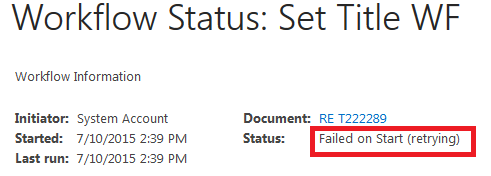
We have email enabled for this list and use email to send email to the list to create item. After emailing several items to the list, you will be able to find some workflows error out. This is constant across several different SharePoint environments. The workflow could be in either "Error Occurred" or "Failed on Start (retrying)".


We have some other SharePoint list designer workflow issues we might need to address later. Please note if the email does not trigger workflow on the list, you might need to verify server setting

DeclarativeWorkflowAutoStartOnEmailEnabled.
 
$spWebService = [Microsoft.SharePoint.Administration.SPWebService]::ContentService $spWebService.DeclarativeWorkflowAutoStartOnEmailEnabled

If it is False, please enable it with the PowerShell command below and then check the results:
$spWebService = [Microsoft.SharePoint.Administration.SPWebService]::ContentService $spWebService.DeclarativeWorkflowAutoStartOnEmailEnabled = $true $spWebService.Update()


After debugging with Microsoft, we found if we add 1 to 5 minutes pause as first activity of the workflow, we are able to complete these workflows. We had to cleanup many failed workflows and make system clean.


Monday, April 20, 2015

SharePoint workflow timer job stuck in paused status - Steps to resolve the issue


If you have worked on SharePoint 2010 long enough, you might notice that SharePoint Workflow Timer Job might stuck at 0% and paused. This could happen on SharePoint 2010 and 2013 for version 2010 workflows. You could follow the steps below to resolve the issue.

  1. Stop Timer service, clean up timer job cache, and restart Timer service as most people suggested.
  2. If this is not working, you might need to tune the workflow configuration to improve the performance.
  3. Cleanup BAD workflows both definitions and instances

Most people could resolve the issues after step 1 and 2. However in our case, we are still constantly having the workflow job paused issue.  Here are some major contributors to this issue.


  • Workflow approval include users who are no longer in the company. The users are removed form AD and workflow failed to start while validating the users.  
  • Workflow notifier include users who are no longer in the company. The users are removed form AD and SharePoint might constantly fail to send the email. This will cause SMTP email stability also.
  • Workflow author or editor include users who are no longer in the company. This does not seem to cause problem as we tested. It might be a good practice to publish them workflows using the valid AD users.
  • Workflow instance without valid workflow definition. The workflow definition removed by users.

You should also review how the workflows used by the end users.  We have a workflow configured to the discussion board and each discussion thread with each attachment will trigger the workflow. It will also create the task list. You can image how many instances will be trigger  on this discussion board!

There are different reports we are developing will help us to identify the workflows that have the issues listed above. One of the key report is the list failed workflows. The "Workflow failover" timer job will continue retry every 15 minutes as default to process failed workflows. If you have increasing number failed workflows, this timer job will have larger and increasing load. Evenmtually, it will failed to handle the load.

Here is the script to report failed workflow for your reference. We have other workflow reports coming soon.

#**************************************************************************************
# Input Arguments
#**************************************************************************************
param()
$startTime = Get-Date

# param()
#**************************************************************************************

#**************************************************************************************
# References and Snapins
#**************************************************************************************
if ( (Get-PSSnapin -Name Microsoft.SharePoint.PowerShell -ErrorAction SilentlyContinue) -eq $null )
{
            Add-PSSnapin Microsoft.SharePoint.PowerShell
}          
#**************************************************************************************

#**************************************************************************************
# References and Snapins
#**************************************************************************************
$reportFile = $myinvocation.mycommand.path.Replace($MyInvocation.MyCommand.name,"") + 'Report_WorkflowActivityUsage_' + $(Get-Date -format "dd_MM_yyyy_HH_mm_ss") + '.csv';
$rows = @();

$line = "WebsiteURL" + “,” + "ItemUrl"  + “,” + "WorkflowAssociateName" + “,” + "Workflow Status" + “,” + "WorkfflowModified" + “,” + "WorkfflowAuther" + “,” + "WorkfflowId"
Add-Content $reportFile $line
#**************************************************************************************

#**************************************************************************************
# Primary Statement Blocks
#**************************************************************************************
cls


$contentWebAppServices = (Get-SPFarm).services |? {$_.typename -eq "Microsoft SharePoint Foundation Web Application"}

foreach($webApp in $contentWebAppServices.WebApplications)
{

    foreach ($siteColl in $webApp.Sites)
    {

        Write-Host "Now Working on Site Collection: $($siteColl.Url)";
        try{
            foreach($spSite in $siteColl)
            {

                    $assignmentCollection = Start-SPAssignment
                    foreach($spWeb in $spSite.AllWebs)
                    {

                            foreach ($list in $spWeb.Lists)
                            {

                              if ($list.WorkflowAssociations.Count -gt 0)
                              {
                                    foreach ($item in $list.Items)
                                    {
                                        foreach ($workfflow in $item.Workflows)
                                        {
                                                if ($workfflow.ParentAssociation.Name -notlike "*Previous Version*")
                                                    {

                                                        $line = $spWeb.Url + “,” + '"' + $item.Url  + '"' + “,” + '"' + $workfflow.ParentAssociation.Name + '"' + “,” + '"' + $workfflow.InternalState + '"'+ “,” + '"' + $workfflow.Modified.ToShortDateString()  + '"' + “,” + '"' + $workfflow.Author  + '"' + “,” + '"' + $workfflow.ParentAssociation.Id  + '"'
                                                        Add-Content $reportFile $line
                                                    }
                                        }
                                    }
                                }

                            }
       
                    }

                    Stop-SPAssignment $assignmentCollection
                    #http://blog.ithinksharepoint.com/2014/06/02/powershell-sharepoint-and-memory-leaks-start-spassignment/

            }
        }catch{}

    }

}

$endTime = Get-Date
#Write-Host "Time after:" $b -ForegroundColor Green

Write-Host -ForegroundColor Yellow "Processed the script in $(($endTime-$startTime).TotalSeconds) seconds .......";


If you have any input to handle the paused workflow issue, please share. We might plan to implement SharePoint 2013 workflow to improve the scalability of the workflow.